Conceptual vs logical vs physical data models


Data modeling is not about creating diagrams for documentation sake. It’s about creating a shared understanding between the business and the data teams, building trust, and delivering value with data. It’s also an investment. An investment in your data systems' stability, reliability, and future adaptability. Like all valuable initiatives, it will require some additional effort upfront. Still, in the long term, the returns on investments in terms of communication, efficiency, data quality, and scalability are substantial.
In this article, you’ll see how conceptual, logical, and physical models can positively impact your business by understanding how they affect these crucial aspects of data modeling:
Shared understanding and communication
Data relationships, structure, and organization
Performance, scalability, and efficiency
Data quality and consistency
Adaptability, scalability, and future-proofing
You’ll also gain the knowledge you’ll need to build a world-class data model and get the buy-in from your stakeholders.
What is a conceptual data model?
A conceptual data model (CDM) operates at a high level, providing an overarching perspective on the organization's data needs. It defines a broad and simplified view of the data a business utilizes or plans to utilize in its daily operations. Conceptual data modeling aims to create a shared understanding of the business by capturing the essential concepts of a business process. These essential concepts are usually captured in an Entity Relationship Diagram (ERD) and the accompanying entity definitions.
Developing a conceptual data model assists your team and stakeholders in understanding the essentials and the big picture – what kind of data you're working with and how different data entities relate. In addition, it creates a shared understanding of the business process and a common language for all technical and non-technical members. While many data teams struggle with communication and trust with their stakeholders, the CDM can help by promoting effective communication.
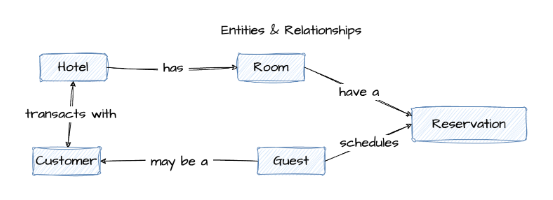
Figure 1 - Example conceptual data model—hotel reservations
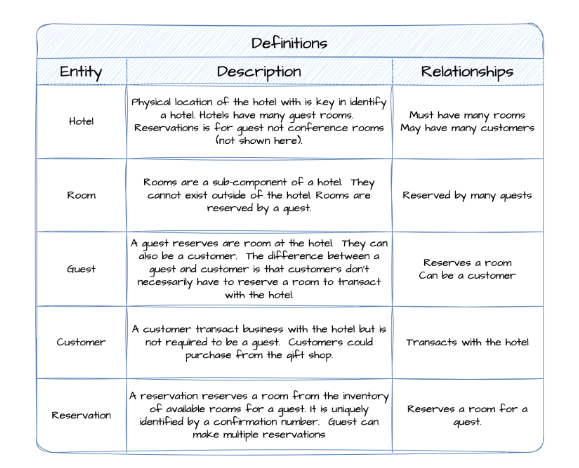
Figure 2 - Example conceptual data model entity definitions
Benefits of a conceptual data model
So, now that you have a clear definition of a conceptual data model, you are probably thinking, what are the benefits? The benefits of a conceptual data model fall into two areas: creating shared understanding and improving communication and collaboration. Both lead to a greater sense of stakeholder trust, The conceptual model also ensures that a physical model is designed such that it not only produces correct results, but enables the business to ask valid questions. For example, can one customer have multiple reservations? Or is the customer and the guest always one-and-the-same?
Shared understanding
Conceptual data models use simple, business-oriented terminology to describe and define data objects and their relationships, creating a universal language that both technical and non-technical stakeholders can understand. They also provide visual representations which are easier to understand than written documents, especially for complex relationships. This shared understanding of the business process is crucial to building stakeholder trust and confidence.
Communication and collaboration
Conceptual models can serve as a focal point for discussions between stakeholders, data teams, and different lines of business, fostering collaboration and trust. In addition, they can help clarify requirements, identify gaps or redundancies, and promote alignment on business rules and policies. In short, communication and collaboration lead to trust, which you’ll need when making important decisions on cost, delivery, and functionality.
What is a logical data model?
A logical data model (LDM) contains representations that fully defines relationships in data, adding the details and structure of essential entities. It’s important to note that the LDM remains data platform agnostic because it focuses on business needs, flexibility, and portability.
The LDM includes the specific attributes of each entity, the relationships between entities, and the cardinality of those relationships. It gives your team a solid framework to follow as you build your systems, and it can be used to effectively and efficiently plan and implement cloud data warehouses, data marts, application databases, or data analysis datasets.
In the conceptual data model, the entities and relationships were all defined. The next step is to use data modeling best practices to go from a conceptual data model to a logical data model; one typically needs to perform the following steps:
Validate the CMD by verifying the entities and relationships are correct in the CDM.
Identify additional attributes for each entity in the model, identify the other attributes needed to complete the entity.
Identify candidate keys by reviewing all the attributes on the entity and identify which attributes uniquely identify the entity. There may be more than one. The goal is to identify which attributes are the best candidates for primary and unique keys.
Select primary keys in collaboration with your stakeholders select the primary key from candidate attributes from the list of candidate keys. The best practice is to have a single attribute that is the primary key, but that’s not always possible.
Normalize to the data model for your specific application. For this case, we are using 3rd Normal Form (3NF) which minimizes redundancy by removing repeating elements from our entity and ensuring all attributes depend only on the primary key. A common approach for analytics modeling is use a dimensional modeling. Unlike 3NF, where the goal is to eliminate redundancy, dimensional modeling involves denormalization to minimize joins and improve query performance. Pro Tip: When entities fail to meet the requirements for 3NF, the resolution is usually to create a new entity and relationship.
Create the ERD entities as normalizing may result in new entities, attributes, relationships, or redistributing attributes to the new entities.
Define the entity relationships and ensure that the relationships are correct by validating them with the stakeholders. Pro Tip: Entities are usually related to only a few other entities, so many relationships may indicate a design issue. For example, in Figure 3, the Hotel entity is connected to a Room entity via the “Has” relationship.
Define the cardinality of relationships by determining how many instances of one entity are related to instances in the related entity. The most common cardinalities are one-to-one, one-to-many, and many-to-many. Cardinality may also be optional. For example in Figure 3, you can see the one-to-many relationship between the Hotel and Room entities. This is often read as “a Hotel has many Rooms.”
Validate the model by verifying the logical data model against business requirements. This includes checking with stakeholders, end-users, and developers to ensure the model accurately represents the necessary data and its relationships.
Iterate and refine for optimal business value. Modeling is often an iterative process, so you might need to refine or update the logical data model based on feedback.

Figure 3 - Logical data model example
Benefits of a logical data model
Just like we did in the conceptual data model, let’s review the primary benefits of a logical data model. The primary benefits of logical data modeling fall into two categories: agile data modeling and data organization. Both of which, maintain the scope of the initiative and improve for efficiency.
Agile data modeling
Logical data modeling is an iterative process that can also be agile. Since logical data models are technology-agnostic, they provide a conduit for iterating over the business logic and business process with the stakeholders. This flexibility ensures adaptability and scalability for future business needs.
Data relationships, structure, and organization
A good LDM presents a clear picture of the data's structure and interrelationships, making it easier to understand the system. The model encourages consistency and standardization to avoid redundancy and maintain data integrity. A logical data model ultimately serves as a blueprint for the physical data model and facilitates database design. It enables database administrators and software engineers to design the physical database efficiently and effectively.
Quality assurance
By identifying errors or inconsistencies in the early stages of system development, logical data models contribute to higher data quality, reliability, and lower cost. LDMs also validate the business requirements by aligning the data structure with business needs.
Of course, other benefits may apply to your organization, but remember that logical data modeling is crucial to better understanding data from a business perspective, better communication among stakeholders, and a solid foundation for physical database design.
What is a physical data model?
A physical data model (PDM) is a data model that represents relational data objects. It describes the technology-specific and database-specific implementation of the data model and is the last step in transforming from a logical data model to a working database. A physical data model includes all the needed physical details to build a database.

Figure 4 - Physical data model
The transition from a logical data model to a physical data model is an iterative process. It involves further refining the data model to achieve the desired database design. Good physical data design often requires an in-depth understanding of data platforms and modeling. Here are the general steps involved in this process:
Select the data platform where the data model will reside as it will affect future physical data design decisions. This is also important because the model will take advantage of platform specific capabilities.
Convert logical entities into physical tables. Each entity in your logical model needs to be converted into a table or even multiple tables. Recall that during the logical data modeling process, candidate keys were identified. Select a primary key for the table from those same candidate keys.
Define the columns by converting each attribute in the logical model into a column on the corresponding table. Additionally, define the data type for each column (integer, varchar, date, etc.).
Define the relationships between parent and child tables. This is achieved by creating a foreign key (FK) attribute in the child table that references the primary key (PK) attribute of the parent table.
Verify the tables are in 3NF which ensure eliminated data redundancy and data integrity. This may involve splitting or combining tables according to the 3NF normalization principles and specific capabilities of the data platform. In Figure 4, a table called Hotel_Customer was added to account for the many-to-many relationship between Hotel and Customer.
Define indexes and partitions by identifying the most commonly used attributes for sorting, filtering and join tables. Optimizing indexes and partitions vary greatly by data platform and use case, so it’s often a very iterative process. It’s best to KISS (keep it simple smarty) it when getting started on optimizing indexes and partitions.
Implement table constraints by defining primary keys, unique keys, null/not-null checks, and other logical constraints on the table. Logical constraints identified in the LDM should also be expressed in the physical data design even when the data platform does not enforce those constraints. Pro Tip: Modern cloud data platforms don’t usually enforce all constraints even though the constraints can be defined. Although the constraints may not be enforced, they are still valuable because they are used by downstream applications and analytics tools to enforce data integrity, create complex data analysis, and improve performance.
Implement the programmability aspects of your data model by creating views, stored procedures, triggers, streams, and tasks. Depending on the complexity of your data platform, you may need to implement views (virtual tables based on a query), stored procedures (pre-compiled groups of SQL analytics statements), triggers (automated actions in response to events), Streams (near real-time ingestion of events), and Tasks (automated data pipelines).
Model validation and standards should be validated with the stakeholders ensuring that PDM meets the business requirements defined in the logical model. Validation testing should also be performed on well defined test data. It’s common to validate and verify the physical data model by creating queries that answer the questions defined by the business.
While there are multiple steps and iterations in physical data modeling, having a well-defined LDM ensures the physical modeling process is efficient and effective. The PDM aims to create a model that accurately represents the business and data requirements and works efficiently within the chosen platform.
Benefits of a physical data model
Most databases are complex, regularly changing, and evolving, so what are the benefits of physical data modeling and having a physical data model (PDM)? The primary benefits for the data team are speed while the business teams benefit from scalability and future-proofing.
Speed and efficiency
The physical data model (PDM) is about how your data will be physically stored, structured, and securely accessed, and it’s optimized for the specific cloud data platform or on-premises database. PDMs ensure optimal configuration for cost, scale, storage, and performance. In a world with consumption-based data platforms, having a well-modeled physical data model ultimately saves time, money, and resources.
Scalability and future-proofing
A well-modeled physical data model makes it much easier to manage the inevitable changes as your business grows and evolves. PDMs provide a blueprint and scalable framework that can accommodate new data sources, business rules, or system integrations, resulting in lower system complexity, reduced obsolescence risk, and faster market speed.
Comparison of conceptual, logical, and physical data models
Table 1 summarizes the conceptual, logical, and physical data models described above.
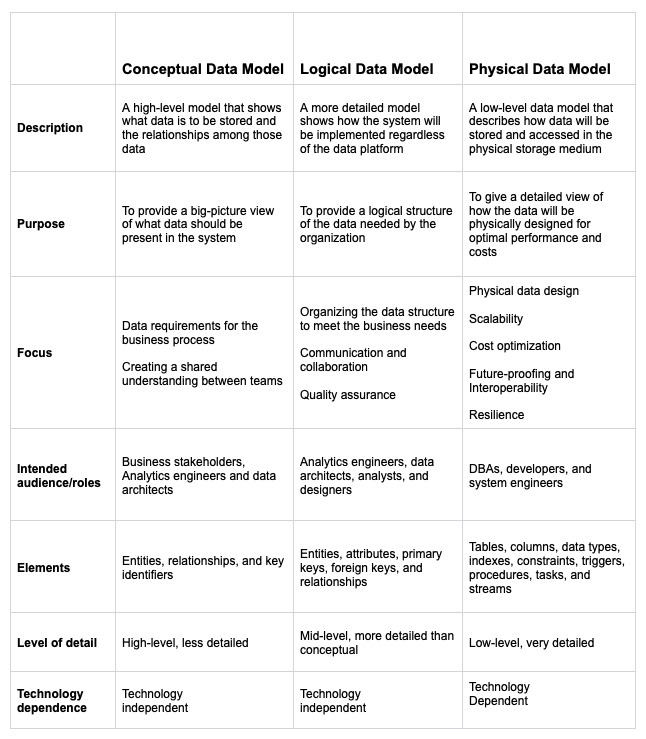
Table 1 - Overview of the model types
Wrapping it all up
Should you be modeling data with conceptual, logical, and physical models? I strongly recommend that you do. Data modeling is an investment and will have substantial returns in the future, including increased speed to market, higher quality, lower cost, reduced product risks, and great trust and collaboration with your stakeholders.
Unfortunately, some data teams ignore best practices for data modeling in the modern data stack and continue to model using the One Big Table (OBT) approach. While OBTs are often chosen for the perceived simplicity and similarity of working with data in a grid or Excel, they miss the opportunity to maximize your ROI.
Data modeling should be agile and delivered in incremental releases reducing the time to market and costs. It’s a valuable business investment that ensures your organization's current and future success. In data, the old saying “pay me now, or pay me later” is really “pay me now, or pay me 10x later.”
On your next data project, ask yourself a few questions.
Am I building the next data asset or just the next tech debt?
Do stakeholders and I have a shared understanding of the business process and model?
Does our model support self-service analytics to drive greater value?
Will improved data quality improve trust and confidence in me or my team?
Can we reduce the complexity and future-proof our data assets?
So get out there and start building a world-class data product to create business value and delight your stakeholders!

